


DEGREE WORKS
IMPORTANT MESSAGE: If you experience issues with Degree Works please clear your cache, log out, and log back in. If issues persist, please submit an ITS HelpDesk ticket (faculty and staff, please use the Degree Works Advisor portlet in Trailhead to submit your ticket).
Frequently Asked Questions
General
Degree Works is an online advising tool to help you and your advisor monitor your progress toward degree completion. Degree Works matches your coursework (completed, currently enrolled, or registered for in the future) to your degree requirements in an easy-to-read worksheet that shows how the courses count toward degree requirements.
Q: Who can use Degree Works?
Degree Works is available to all degree-seeking students. Advisors, faculty, and selected staff also have access for the purpose of supporting your progress through your academic career.
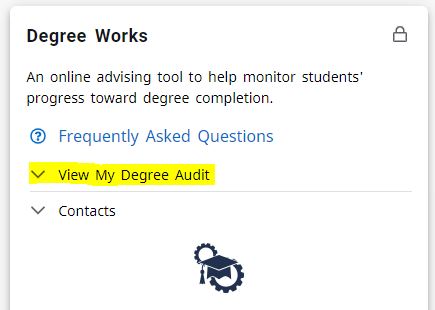
Q: How can I get into Degree Works?
- Log into Trailhead and select the ‘Degree Works’ card.
- Click ‘View my degree audit’ and select ‘Degree Works’.
Q: Can I register for classes in Degree Works?
No, you may register online only through Trailhead.
Q: How current is my information in Degree Works?
The information in Degree Works is refreshed each night. Any changes made today (e.g., grade changes or classes added/dropped) will be seen in Degree Works tomorrow.
Q: Why can’t I see my transfer credits?
Undergraduate students, if you just recently sent your transcripts to Mines it may still not be evaluated as this can take several weeks. If it has been longer than that please contact transfer@mines.edu to find out the status.
Graduate students, contact the Office of Graduate Studies for assistance, grad-services@mines.edu or your advisor/department.
Q: What if I have issues accessing Degree Works on my computer?
Try clearing your browser data (cached files and cookies). You may also want to try a different browser. If you are still unable to get in please contact ITS for further assistance.
Q: The GPA calculators are not reflecting the right information, why?
If this is your first semester at Mines, you will not get accurate information using these calculators based on the current Degree Works GPA set up. You can use the GPA Calculator instead.
Audit
A Degree Works audit is a curriculum evaluation separated into different blocks of requirements, such as the general education, major, minor, concentration, and other requirements. Each block within the audit works as a checklist with boxes that are automatically checked when a requirement is met.
Q: What if information in Degree Works is not up to date?
There could be several reasons why information in Degree Works is not up to date. One is that Degree Works may not have been refreshed since a change was made (information is refreshed nightly) to a student record. Second, there could be pending paperwork that has not been processed (course substitution, change of program, etc.) If you have recently submitted an academic form, check with the Registrar’s Office.
Q: Are my grades visible in Degree Works?
Yes. Once grades have been posted at the end of the term, they are viewable in Degree Works.
Q: Can I see a list of all of the classes I’ve taken?
Yes. On the Audits tab, click on the Class History link at the top for a list of courses taken at Mines as well as transfer and advanced placement courses.
Q: Can I change my major/minor/ASI through Degree Works?
Undergraduate students should submit a Major/Advisor Change Form or Minor/ASI Declaration Form.
Graduate students should contact the Office of Graduate Studies for more information on options to change their program.
Q: Does Degree Works include my AP credit and transfer work?
Once AP scores are received from the College Board and credit is granted, they are posted to the student’s record and will appear on the audit.
Q: How do I know what classes I need to take?
Undergraduate students – Your audit will outline courses needed to meet degree, major, minor, and/or concentration requirements within each block. You can also see a consolidated list of courses not yet completed by selecting Registration Checklist from the Worksheets menu. You may then use this information to discuss your plan with your Academic Advisor.
Graduate students – you must consult with your advisor/department.
Q: I think my audit is incorrect. What should I do?
Ask your academic advisor for assistance. The first step is to clarify what information you believe is wrong.
For undergraduate students, these are the most common problems and courses of action:
> My major is wrong on my audit.
If you have officially changed your major, the Degree Works audit will display only your active degree audit. If the program change is effective for a future term, the change will not reflect until that term.
> The requirements for my major are wrong.
Note the Catalog Year that appears on the major requirements block of the audit. According to your official academic record, this is the catalog that you are following to complete your major requirements. If you believe you should be using older or newer curriculum requirements, contact the Registrar’s Office.
> My transfer courses do not appear in the right place.
If you are concerned about a transfer course that should be applying in the audit, contact the Registrar’s Office.
> Classes are not applying in the right place.
Degree Works uses a “best fit” approach to meet requirements, so classes may apply to different sections as you take more courses. If you have further questions, please contact your academic advisor or the Registrar’s Office.
> My advisor or department chair gave me permission to substitute a course, but it’s not showing on my audit.
Check with your advisor to be sure the proper paperwork has been completed. Once substitutions are entered and a new audit has been run, the change will appear on the audit.
> My minor or ASI is missing from my audit.
If you have not officially declared your minor or ASI, contact your academic advisor and submit a Minor/ASI Declaration Form If you have already officially declared your minor, the Registrar’s Office may still be updating your records.
Graduate students, these are the most common questions and answers to why your audit may be incorrect:
> Have you submitted your Degree Audit form?
If not, make sure to submit your audit form to your department.
> If you have submitted the Degree Audit form, did you take all the courses noted on the form?
If not, then you need to submit an Addendum to Degree Audit. If you have submitted the Degree Audit and think there is an error, contact registrar@mines.edu.
Q: When should a student/advisor review a degree audit?
- Before registering for an upcoming semester
- After you register to ensure that the courses apply to your program requirements
- After grades are posted for each semester
- Any time changes are made to your schedule or major
- A degree audit can be reviewed at any time; however, it is recommended to do so at least four times a
Q: How is my degree audit different from my transcript?
Your degree audit is a tool to provide you with academic information related to your degree progress. It displays courses required and completed in your degree program. Your transcript is your official university academic record and provides a chronological list of courses completed and other academic information.
Q: I’ve seen the @ symbol in several places on my audit. What does this mean?
This is a wild card in Degree Works. For example, if the @ sign is followed by course numbers (@1000:4999), it means that you may take a course in any subject area within the specified course number range. In this case, any 1000- 4000-level course in any subject area is allowed.
Graduate students will have more specific course requirements. This symbol may not apply. Make sure you complete the Degree Audit form.
Q: Who should I contact if I still have questions or disagree with the audit?
Please contact your academic advisor.
Graduate students, make sure you have submitted your Degree Audit form or Addendum. These two forms can take several days/weeks to process. If the form has been processed, and you still have questions/concerns with your audit, contact registrar@mines.edu for further assistance. You can also contact the Office of Graduate Studies for questions, grad-services@mines.edu.
What-If Audit
Q: I am thinking of changing my major. How can I see what would be required if I made this change?
You can use the “What-If” option on the Audits tab to create an audit based on requirements for the program your interested in. Be sure to select a Degree, Catalog term and Major along with any corresponding Minors or Concentrations. What-If audits do not guarantee that you will be able to major in the area you select. If you decide you’d like to change your major, contact the academic advisor of the new major for information and instructions.
Q: Can my advisor see my What-If audit?
Since What-If audits are not stored in Degree Works, your advisor can only see your results if the two of you work through a What-If procedure together. You can, however, print a copy to show your advisor.
If none of these problems describes your situation or if you need additional help identifying what’s wrong, contact your academic advisor.
Advising
Q: Where does Degree Works get information from?
Degree Works comes directly from Banner.
Q: How can I update a student’s degree audit?
You cannot update course or program information in Degree Works. If you would like to make changes to a course fulfilling a requirement you will need to go through the Course Substitution process.
If a student wants to change or declare a major, minor, or ASI, please complete the appropriate form found HERE and the Registrar’s Office will update their information.
Changes to a student’s record may take several business days to process and reflect their degree audit.
Q: There are a lot of courses in the “Courses Not Applied” section. Why?
There may be more than one reason why you see a lot of courses in this section. First, it could be that the student has changed majors, so courses that were once required may no longer be needed by the new major. Second, they may have taken more elective courses than required by the major. Lastly, they may be pursuing a minor or ASI they have not yet officially declared.
Q: The program requirements don’t look quite right. Why?
Always make sure to click the refresh icon at the top of the audit to see the most up-to-date information. If the audit still appears incorrect double check the catalog year to make sure it matches the program’s requirements. If all these appear correct please submit a “Support Request” ticket through your advisor portal in Trailhead.
Contact Us
Registrar's Office
Student Center, Suite E280
1200 16th Street
Golden, CO 80401
Registration or student record questions
registrar@mines.edu
303-273-3200
FAX: 303-384-2253
Residency petition & COF questions
residency@mines.edu
Transfer credit questions
transfer@mines.edu
Military and VA Benefit related questions
veterans@mines.edu
Graduation questions
graduation@mines.edu