

Images/Media
Images and Media
Images and media are organized into shared folders to make it easier to find approved Mines imagery and manage your department's files. When adding images to your website, always check the existing image libraries before uploading new files.
Under Categorised – mines.edu
- Mines Image Repository: A collection of approved Mines images available for use across university websites. Always look here first before searching Canto for additional images. You can use any images in this folder.
- Mines Branding: Contains approved Mines branding assets, including icons and unit IDs, that you can use on your website.
- Faculty Headshots: Contains faculty headshots that are already available in the CMS. You can select these images directly without uploading them again.
These are shared university resources. You can select and use images from these folders, but you cannot upload new files or make changes to them.
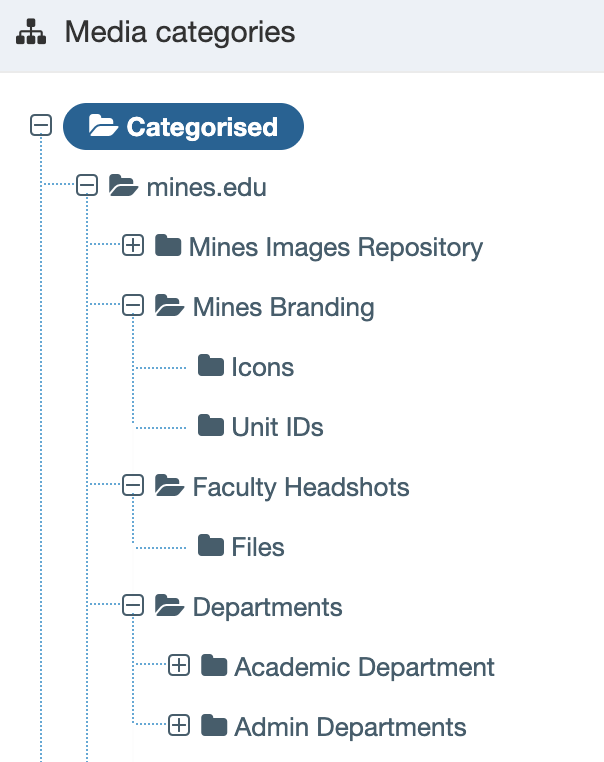
Departments
Each department has its own media folder for managing images and files specific to its website.
Find your department's folder under Departments. This is where you should upload new images for your website.
Keeping images in the appropriate department folder helps maintain an organized media library, prevents duplicate uploads and makes files easier to find and reuse.
Maximum File Upload Size
The maximum file upload size is 5 MB per file. Images larger than 5 MB must be resized or compressed before uploading.
To help keep our websites fast and efficient, always optimize images for the web before uploading them. Large image files can slow down page loading times and negatively affect the user experience, especially on mobile devices.
PDF Documents
Avoid using PDF documents whenever possible. Information should be published directly on a webpage rather than in a PDF to improve accessibility, usability and the overall user experience.
If a PDF is necessary, it must meet accessibility requirements before being uploaded to the website. This includes proper heading structure, reading order, descriptive links and accessible tables and images.
If you need assistance or would like more information about PDF accessibility and remediation, please contact the MarCom team for guidance.